

Betternet VPN
Betternet VPN is an Android VPN proxy for encrypting internet traffic, masking the device’s IP address, and connecting through VPN servers in different locations. It is presented for private browsing, public Wi-Fi use, streaming, gaming, shopping, and other online activities, with separate free and premium service details described in the source.
Screenshots
About this app
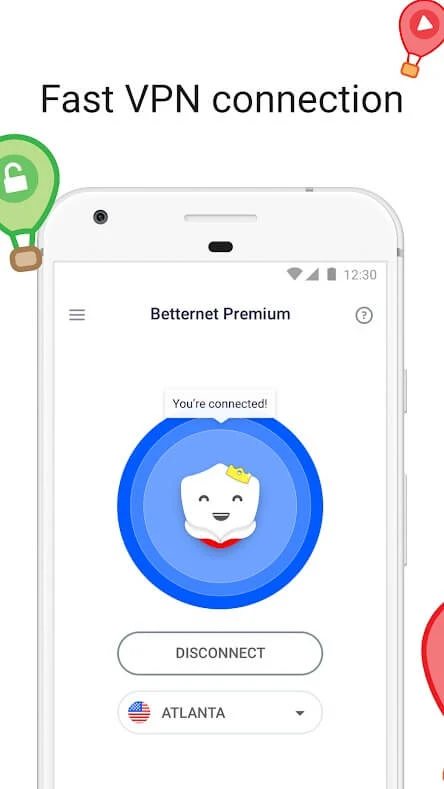
Betternet VPN is an Android VPN proxy that helps route a device’s internet connection through a VPN server, encrypt traffic, and mask the user’s IP address. The app is designed around a one-tap connection: after opening it, the user can tap Connect and allow the service to select a server. When the connection is active, the app indicates that the device is connected to an encrypted VPN connection.
One-tap connection for everyday internet use
The main purpose of Betternet VPN is to provide a private connection while using websites and apps on an Android phone. The source describes use cases including browsing, shopping, online games, video viewing, and connecting through public Wi-Fi or cellular data. By routing traffic through the VPN, the app changes the visible IP address and can make the connection appear to come from the selected VPN location.
The service is also described as a way to access websites and apps that may be restricted in a user’s location. This capability depends on the destination service and the available VPN connection; the source presents it as a function of the proxy rather than a guarantee that every restricted service will be reachable.
Server locations and location selection
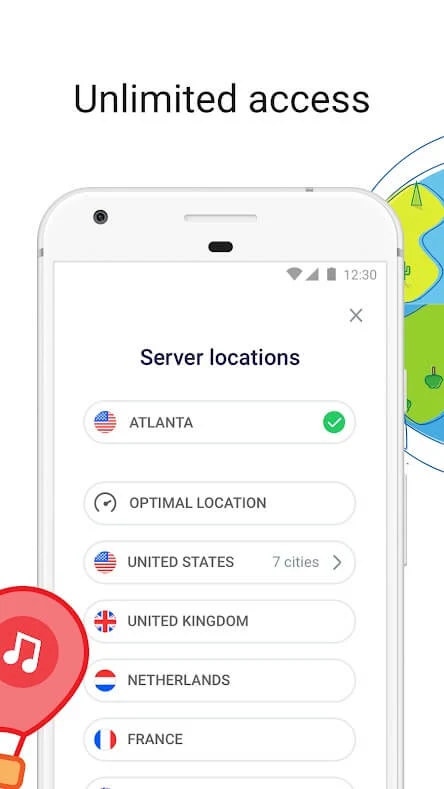
Betternet VPN provides access to VPN servers in different countries. The supplied server list names the United States, France, Singapore, the United Kingdom, Australia, Hong Kong, Canada, Germany, the Netherlands, and Japan. The application description also refers to a broader global server network and says that users can choose a preferred connection option, although it does not provide a complete location list.
Changing the VPN location changes the server through which the connection is routed. This can be useful when a user needs a connection associated with another country, while the app’s central controls remain focused on connecting or disconnecting rather than on managing a complex network configuration.
Traffic encryption and public Wi-Fi use
The source states that Betternet VPN encrypts internet traffic and is intended to add privacy when the device connects to public Wi-Fi hotspots. It describes the VPN as a layer between the Android device and the internet, helping keep the IP address and connection route less visible to websites and other network observers. The app is also presented for use on cellular data networks.
These functions are relevant when using an unfamiliar wireless network or accessing accounts and personal information away from home. The source specifically mentions passwords and personal data as information the app is intended to help protect, but it does not establish that a VPN can prevent every form of attack or guarantee complete anonymity.
Free and premium service details
The supplied information distinguishes between free and premium use. The free Android version is described as including advertisements. The source also discusses a 500 MB daily traffic limit, but states that this limit does not work in the described version, so it should not be treated as a dependable current restriction.
Premium details in the source include a seven-day trial for new users. Starting that trial requires registration with billing information, and the source advises cancelling before the trial ends if automatic charging is not wanted. It also describes a possible 30-day refund when premium traffic use remains under 50 MB, while noting that premium access does not guarantee access to every streaming service.
Restoring premium access on another device
If the application is uninstalled, the source says that an existing premium account can be restored by selecting “I’m already premium,” entering the associated email address, and following the activation link sent by email. It states that one premium account can be used on up to six devices. This account-recovery path is separate from the initial one-tap VPN connection and applies to users who already have premium access.
Android availability and basic use
The supplied FAQ lists support for Android 5.x and newer. It also notes that the app cannot be downloaded through Google Play on a device that cannot connect to the store, and identifies streaming media players, Sony devices, and Amazon Kindle devices as unavailable for installation in the described circumstances.
For the basic Android connection, the documented sequence is to install Betternet VPN, open it, and tap Connect. The app then searches for a server and reports when the connection is established. At that point, the device uses the VPN connection without requiring further setup according to the supplied instructions.
Version history
View all28 Jul 2025 · stable
Frequently asked questions
Which Android versions are listed as supported?
The supplied FAQ lists Android 5.x and newer.
Which server countries are named in the source?
The source names servers in the United States, France, Singapore, the United Kingdom, Australia, Hong Kong, Canada, Germany, the Netherlands, and Japan.
Can a premium account be restored after reinstalling the app?
Yes. The source says to choose “I’m already premium,” enter the account email, and use the activation link sent by email.