

GarageSmart - Door Opener
GarageSmart - Door Opener enables you to manage, monitor, and operate residential or commercial garage doors and gates remotely from an Android phone or tablet. By pairing the app with a GarageSmart device, you can control multiple units, check real-time door status, and review a complete access history log.
Screenshots
About this app
Remote Management and Operation
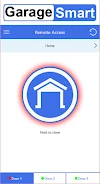
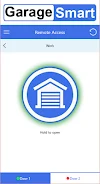
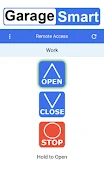
GarageSmart - Door Opener helps users control and monitor their garage doors and gates from anywhere in the world using an Android device. Designed to work alongside a compatible GarageSmart hardware device, the app allows you to open, close, or stop garage doors effortlessly. It supports both residential and commercial setups, providing a flexible solution for various types of automated entry points.
Multi-Device Control and Status Monitoring
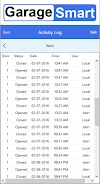
The application lets you manage multiple GarageSmart devices from a single interface, making it practical for properties with more than one garage door or gate. You can view the live status of each door to check whether it is currently open or closed. Additionally, the app maintains an activity history log that records who operated the doors and when those actions took place.
Accessibility and User Interface
The interface is designed to be user-friendly and includes support for multiple languages to accommodate different users. There is no restriction on the number of individuals who can download and operate the app, provided they possess a valid Remote Key for access.
Version history
View all04 Jun 2024 · stable
Frequently asked questions
What equipment is required to use the GarageSmart app?
You need a physical GarageSmart device installed on your garage door or gate, along with the app installed on an Android phone or tablet and a valid Remote Key.
Can I control more than one garage door using the app?
Yes, the app allows you to control multiple GarageSmart devices from a single interface.
Is there a limit on how many users can access the app?
There is no limit to the number of users who can download and operate the app, as long as they have a valid Remote Key.