

iManager
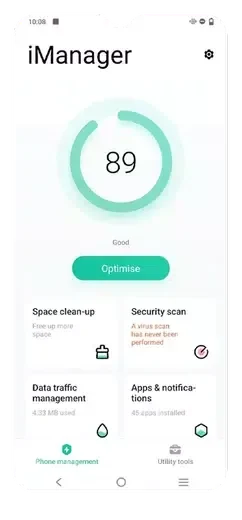
iManager brings together cleanup, device diagnostics, security tools, and battery-saving suggestions. It also supports vivoCloud backups and customizable system maintenance.
Screenshots
About this app
Overview
iManager combines phone maintenance tools in one Android utility, helping users review storage, performance, security, and data use. Its cleanup tool removes cache, residual files, and browser traces, while diagnostic checks can flag issues such as lag, freezing, or overheating. The app also identifies power-hungry apps and suggests possible adjustments. For people who want routine device care alongside privacy and backup options, iManager groups these functions in one place rather than focusing on a single maintenance task.
What You Can Do
⭐ Run a one-tap cleanup to remove cache, leftover files, and browser traces that may be taking up storage.
⭐ Use memory management to close background tasks, which the app presents as a way to help other apps run smoothly.
⭐ Check the security center for device and network scans, app locking, encryption options, and a payment safe box.
⭐ Review power-consuming apps and use the app’s suggested fixes to address battery drain. Suggested adjustments may include dimming the display, reducing data use, or enabling airplane mode when the phone is not in use.
⭐ Run diagnostic checks for common problems, including lag and overheating, and review the recommendations provided.
⭐ Use vivoCloud integration to back up contacts, messages, photos, videos, and other supported content.
⭐ Customize system settings and schedule maintenance for routine care.
Using the App
The tools cover both on-demand checks and routine upkeep. A user can start with a cleanup or diagnostic check, then consider the recommendations shown for detected issues. Power-saving suggestions may involve changing settings rather than only identifying high-drain apps. The source also describes customizable settings and scheduled maintenance, giving users options for how some routine care is handled. It does not specify which settings can be customized or how often maintenance can be scheduled.
Why It May Appeal
✅ Storage cleanup, diagnostics, security options, and power-management suggestions are collected in one utility, which may suit users seeking several kinds of phone maintenance together.
✅ The diagnostic and battery tools provide recommendations alongside identifying potential issues, while vivoCloud integration adds backup options for several types of personal content.
Things to Consider
❎ iManager is an Android app, so it is not presented as an option for users on other mobile platforms.
❎ The available information does not specify a minimum Android version or explain the precise scope of its scans, encryption, or backup coverage. Check the app listing and settings for details relevant to your device and data.
Version history
View all22 Jun 2026 · stable
Frequently asked questions
What tools does iManager include?
It includes storage cleanup, memory management, device and network scans, app lock and encryption options, diagnostics, and battery-use suggestions.
Can iManager back up personal content?
The source describes vivoCloud integration for backing up contacts, messages, photos, videos, and more.
Does iManager help identify battery drain?
Yes. It identifies power-consuming apps and suggests possible adjustments, such as dimming the display or reducing data use.