

Instander
Instander adds Instagram-focused options for saving media, adjusting privacy settings, and controlling data use. It also includes profile-picture viewing, copying tools, and settings for uploads and gestures.
Screenshots
About this app
Instander is an Android app for Instagram users who want additional controls for browsing, messaging, and handling media. It addresses tasks such as saving photos, videos, reels, and stories to a device, while offering settings for story viewing and chat indicators. Its clearest practical benefit is bringing these tools together with options for managing data use and media quality. The app also includes gesture controls and utilities for copying profile bios and comments, though some features depend on Instagram’s own handling of uploaded content.
What can you save, and how do downloads work?
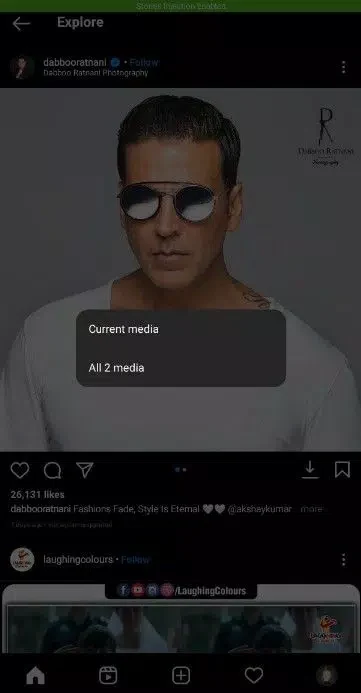
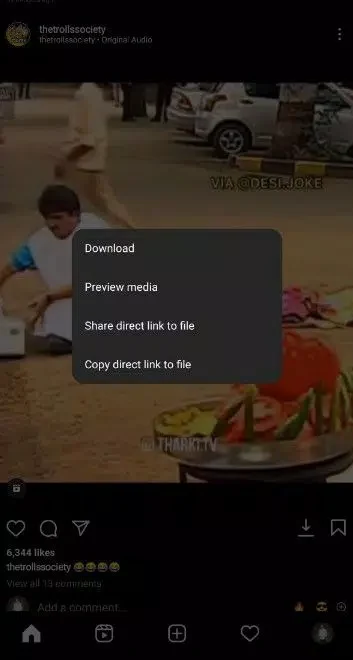
Instander provides download options for images, videos, reels, and stories, so users can keep selected media on their devices without taking a screenshot. The source describes a download button on posts and says the story download option is available from the menu in the upper-right corner. These controls may be useful when someone wants to view saved material later or keep a personal copy of content.
The app also offers a full-size view of profile pictures, with zooming and original-quality viewing described in the listing. That can help users inspect a profile image more closely. The source does not specify file-management options or restrictions on what content can be downloaded, so those details should not be assumed.
Which privacy controls are available while browsing or chatting?
For stories, Instander describes an anonymous viewing option intended to let users watch without the poster knowing. In chats, settings can hide the typing indicator and seen status. These controls let users browse or respond with fewer visible activity signals, including choosing when to reply without showing that they are typing or have read a message.
Ghost Mode groups some of these privacy settings, including controls for typing status. The listing presents these as user-adjustable options; it does not provide details about how every setting behaves in every Instagram interaction. Gesture controls are also mentioned: users can move between posts and like content with a swipe, offering an alternative to tapping through those actions.
Can you control data use and upload quality?
Data Saver options are intended for users who want to reduce internet use. The described controls include disabling video autoplay and limiting background data use. These settings are relevant when a user has a restricted data plan or wants to avoid videos playing automatically while browsing.
Instander also includes options for higher-resolution photo and video uploads, and a setting described as improving story quality. However, the source notes that Instagram processes uploaded media and may compress it. It specifically says that even an upload at up to 12 Mbps cannot be guaranteed to retain its quality after Instagram’s processing. The app’s upload controls therefore do not ensure that the final media will appear at the selected quality.
What other tools and settings does the app include?
Users can copy profile bios and comments, which may be useful when they want to reuse text rather than type it again. The source also describes a profile badge-related facility involving a donation through the app’s settings and a screenshot sent by email. It does not establish that this process provides official Instagram verification, so the badge description should not be treated as confirmation of an Instagram-issued status.
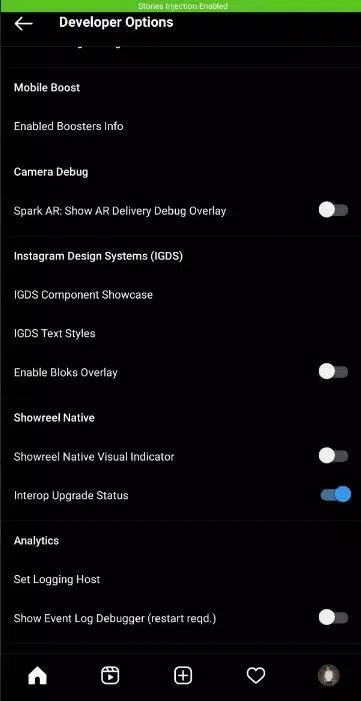
Developer settings include options to back up and restore the app’s settings. The listing cautions that changing developer options may cause the app to crash or stop working properly, and positions them as options for people with app-development experience rather than typical users. The source does not explain every available developer setting.
Who may find Instander useful?
Instander may suit Instagram users looking for built-in media download controls, more discreet story and chat activity, or additional ways to manage autoplay and background data. Its copying tools and upload-quality options may also matter to users who work with profile text or share photos and videos. Before choosing it, users should consider that Instagram may compress uploaded media and that the source does not guarantee the results of the badge-related process.
Version history
View all18 Jun 2026 · stable
Frequently asked questions
Can Instander be installed alongside the official Instagram app?
The source distinguishes a cloned version, which it says can be installed alongside standard Instagram, from an uncloned version, which it says requires uninstalling the official app first.
What does the source say about temporary limits on liking or commenting?
It says Instagram may restrict liking or commenting when activity is treated as spam and states that these restrictions are removed after 24 hours.